
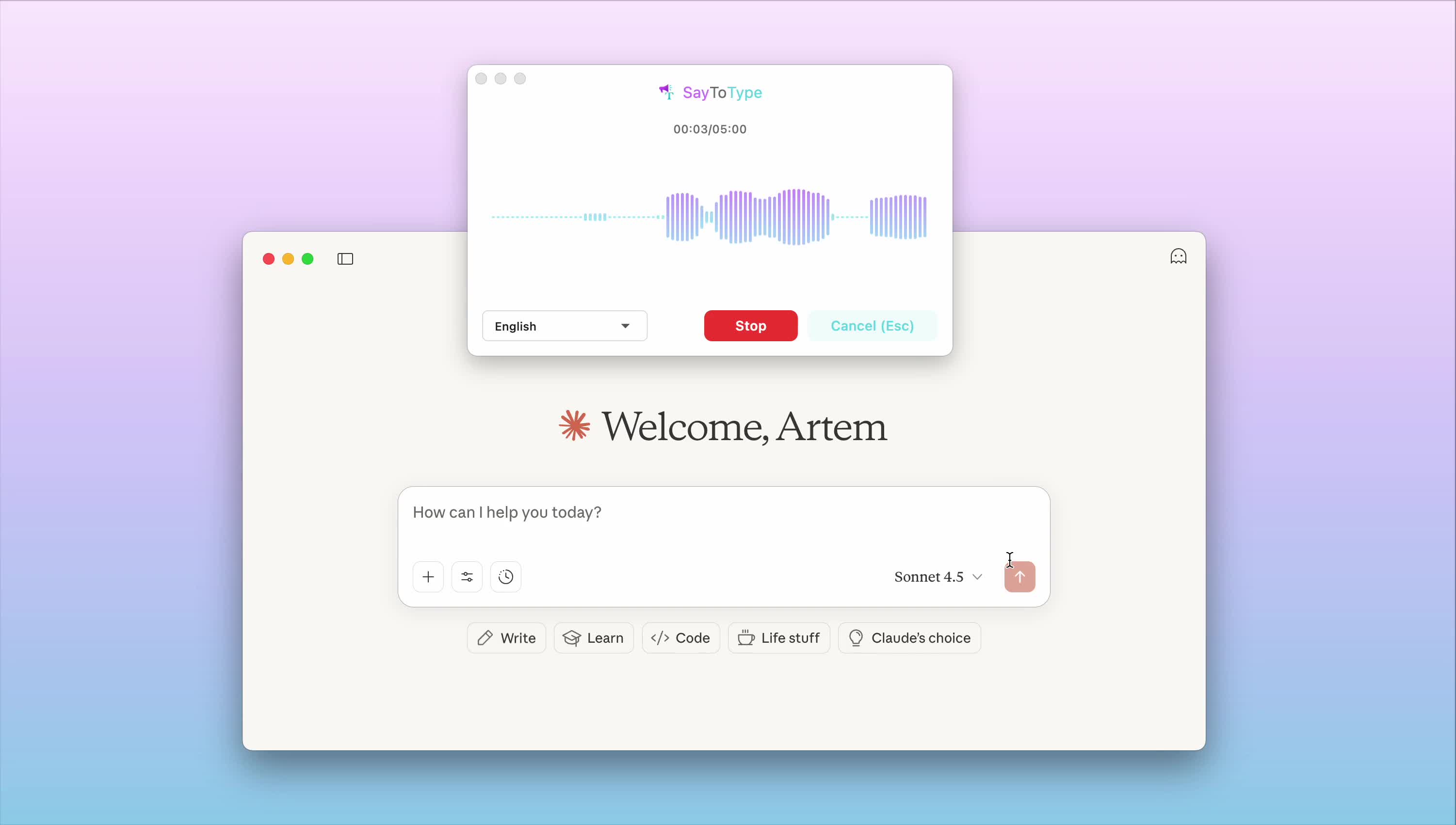
What You Need to Know About Claude Voice Mode
If you're searching for "Claude Voice Mode," you've probably discovered that Claude AI currently doesn't have a built-in voice mode feature. While many users expect this functionality, Anthropic hasn't released an official voice interface for Claude yet.
However, the demand for voice interaction with Claude is real, and SayToType provides the perfect solution to bridge this gap.
Why Users Want Voice Mode for Claude
Voice interaction with AI assistants has become increasingly popular for several compelling reasons:
Increased Productivity: Speaking is faster than typing, especially for longer queries or when you're multitasking. Users report up to 3x faster input speeds using voice compared to keyboard typing.
Hands-Free Operation: Developers, content creators, and professionals often need to interact with AI while their hands are occupied with other tasks, whether coding, designing, or taking notes.
Accessibility: Voice input makes AI more accessible to users with physical disabilities, typing difficulties, or those who simply prefer verbal communication.
Natural Communication: Many people find it easier to express complex ideas and questions through speech rather than written text, leading to better formulated queries and more productive conversations with AI.
The Current State of Claude Voice Features
As of 2025, Claude by Anthropic does not offer native voice input or output capabilities within its official interface. Users can only interact with Claude through text-based chat on the web platform, mobile apps, or via API integrations.
This creates a significant gap for users who have become accustomed to voice interactions with other AI assistants like ChatGPT's voice mode, Siri, or Google Assistant.
Introducing SayToType: Your Voice Solution for Claude
SayToType is a next-generation desktop application that transforms speech into text quickly and accurately, making it the perfect companion for working with Claude AI. Instead of waiting for an official voice mode, you can start using voice input with Claude right now.
What Makes SayToType Perfect for Claude
Universal Compatibility: SayToType works with ALL applications, including Claude's web interface, desktop apps, and any text editor where you prepare prompts. This means you can speak naturally and see your words appear instantly in Claude's chat.
Maximum Accuracy: Using powerful AI speech recognition models, SayToType delivers highly accurate transcription even with background noise and various accents - crucial when crafting precise prompts for Claude.
Multilingual Support: With support for 47 languages and counting, you can interact with Claude in your preferred language, whether you're asking questions in English, Spanish, German, Polish, or dozens of other languages.
Intelligent Processing: SayToType doesn't just transcribe - it understands context. You can set custom prompts to control the style and format of your text, perfect for creating well-structured queries for Claude.
Key Features That Enhance Your Claude Experience
Automatic Translation: Speak in your native language and have SayToType automatically translate it to English (or any other language) before sending to Claude. This opens up Claude's capabilities to non-English speakers seamlessly.
Low Resource Usage: All AI computations happen in the cloud, so SayToType remains light and fast even on older hardware. This means you can run Claude in your browser and SayToType simultaneously without any performance issues.
Cross-Platform: Works consistently on both Windows and macOS with the same high accuracy, so you can use Claude with voice on any desktop system.
Privacy & Security: All data is encrypted and not used for AI training, ensuring your sensitive prompts and conversations with Claude remain private.
Flexible Recognition Modes: Set recognition language, translation language, and custom formatting to match how you want to interact with Claude.
How SayToType Works With Claude: Step by Step
Using SayToType to add voice input to Claude is incredibly simple:
- Install SayToType: Download and install the desktop app for Windows or macOS
- Open Claude: Launch Claude in your web browser or desktop app as usual
- Activate Voice Input: Click in Claude's text input field and press SayToType's hotkey
- Speak Your Query: Express your question or prompt naturally - SayToType will transcribe it in real-time
- Send to Claude: Your transcribed text appears in Claude's input field, ready to send
The entire process takes just seconds, transforming your Claude experience from typing to natural conversation.
Real-World Use Cases: Voice + Claude
Here's how professionals are using SayToType with Claude to enhance their productivity:
Developers and Programmers
Developers use SayToType to describe coding problems to Claude while their hands stay on the keyboard or reviewing code. "Create a React component that displays a user profile card with hover effects and responsive design" - spoken in seconds instead of typed over a minute.
Content Creators and Writers
Writers brainstorm with Claude by speaking ideas aloud using SayToType, generating multiple article outlines, headlines, or content variations rapidly. The natural flow of speech often produces more creative prompts than typed queries.
Researchers and Students
Students can ask complex questions to Claude while reading papers or taking notes. SayToType captures multi-part questions perfectly: "Explain the differences between supervised and unsupervised learning, give examples of each, and suggest which would be better for customer segmentation."
Business Professionals
Executives and managers use voice to quickly ask Claude for meeting summaries, email drafts, or strategic analysis while multitasking or on the go.
Non-Native English Speakers
Users can speak in their native language using SayToType's translation feature, automatically converting their query to English before Claude processes it, then translating Claude's response back if needed.
Why SayToType Is Better Than Alternatives
When looking for voice input solutions for Claude, you have several options. Here's why SayToType stands out:
vs. Built-in OS Dictation: Operating system dictation tools lack the accuracy and context awareness of SayToType's AI-powered recognition. They also struggle with technical terminology and multi-language scenarios.
vs. Browser Extensions: SayToType works universally across all applications, not just web browsers. You can use it with Claude's desktop app, in text editors for prompt preparation, or anywhere else you need voice input.
vs. Generic Voice-to-Text Apps: SayToType is designed specifically for professional use with AI tools like Claude. Features like custom prompts, automatic translation, and intelligent formatting make it ideal for crafting complex AI queries.
vs. Waiting for Official Claude Voice Mode: Why wait when you can have voice input now? SayToType gives you immediate access to voice interaction with Claude, and even if Anthropic releases an official voice feature later, SayToType will continue to work across all your other applications.
Technical Specifications
Supported Languages: 47+ languages including English, Spanish, French, German, Italian, Portuguese, Polish, Russian, Chinese, Japanese, Korean, Arabic, Hindi, and many more
Platforms: Windows 10/11 and macOS 11+
Internet Connection: Required for cloud-based AI recognition (offline mode in development)
System Requirements: Minimal - works smoothly even on older computers due to cloud processing
Integration: Works with any application that accepts text input, including web browsers, desktop apps, text editors, and IDEs
Getting Started With SayToType and Claude
Ready to add voice capabilities to Claude? Here's how to begin:
- Download the application for your operating system
- Install and launch SayToType - the setup takes less than a minute
- Configure your hotkey for quick voice activation (customizable to your preference)
- Open Claude in your browser or app
- Start speaking - click in the text field, press your hotkey, and speak naturally
That's it! You now have voice input for Claude.
Pricing: Honest and Transparent
SayToType uses a fair pricing model that reflects the real cost of high-precision AI recognition:
No "Lifetime" Gimmicks: Unlike questionable unlimited plans, SayToType offers honest pricing based on actual usage and costs.
Subscription Plans: Choose a plan that fits your usage level, with options for casual users, professionals, and power users.
Free Trial: Test SayToType with Claude before committing to a subscription.
Check out our pricing page for current details and plan comparisons.
Privacy and Data Security
Your conversations with Claude may contain sensitive information, business strategies, or personal data. SayToType takes privacy seriously:
- Encrypted Transmission: All voice data is encrypted during transmission to SayToType's servers
- No AI Training: Your voice recordings and transcriptions are never used to train AI models
- Automatic Deletion: Voice data is processed and immediately deleted - nothing is stored long-term
- GDPR Compliant: Full compliance with European data protection regulations
- Secure Infrastructure: Enterprise-grade security protocols protect your data
Advanced Features for Power Users
SayToType includes several advanced features that make it particularly powerful when used with Claude:
Custom Prompts: Add instructions like "format as bullet points" or "use technical terminology" to shape how your speech is transcribed, creating perfectly formatted prompts for Claude.
Contextual Recognition: SayToType learns technical terms, proper nouns, and domain-specific vocabulary, improving accuracy for specialized Claude queries.
Multi-Language Mixing: Speak in one language and have it translated to another, or mix languages in a single query - perfect for multilingual Claude interactions.
Future Roadmap
SayToType is continuously evolving. Upcoming features include:
Offline Mode: Local model support for voice recognition without internet connection, ensuring privacy and availability anywhere.
Voice Commands: Special shortcuts for common Claude interactions like "send message," "clear chat," or "new conversation."
Integration Presets: One-click configurations optimized for specific use cases like coding with Claude, content creation, or research.
Team Features: Shared vocabulary and custom prompts for organizations using Claude for collaboration.
Frequently Asked Questions
Q: Is SayToType an official Anthropic product?
A: No, SayToType is a third-party application developed independently. Claude and related trademarks belong to Anthropic. SayToType is not affiliated with or endorsed by Anthropic. It's a universal voice-to-text solution that works with Claude and all other applications.
Q: Does SayToType work with Claude's free tier?
A: Yes! SayToType works with any version of Claude - free, Pro, or API - because it simply converts your speech to text that you can use in Claude's interface.
Q: Can I use SayToType with other AI tools besides Claude?
A: Absolutely! SayToType works with any application, including ChatGPT, Gemini, Perplexity, coding environments, text editors, email clients, and more. It's a universal voice input solution.
Q: What happens if I have an accent or speak non-standard English?
A: SayToType's AI models are trained on diverse speech patterns and handle accents very well. The system continuously improves its understanding of different speech patterns.
Q: How accurate is the transcription?
A: SayToType uses advanced AI models achieving 95%+ accuracy for clear speech, even outperforming native OS dictation tools in many cases.
Q: Do I need a powerful computer to run SayToType?
A: No! Since processing happens in the cloud, SayToType runs smoothly even on older computers. You just need a working microphone and internet connection.
Q: Can I try SayToType before buying?
A: Yes, SayToType offers a free trial so you can test it with Claude and other applications before committing to a subscription.
Conclusion: Transform Your Claude Experience Today
While Claude doesn't currently offer a built-in voice mode, SayToType provides an immediate, powerful solution for voice interaction with Claude AI. Whether you're a developer crafting complex code requests, a writer brainstorming content ideas, a student researching topics, or a professional working on the go, SayToType makes Claude more accessible and productive.
The combination of SayToType's accurate, AI-powered voice recognition with Claude's advanced language understanding creates a seamless experience that feels like natural conversation with an AI assistant.
Ready to experience Claude with voice?
Download SayToType and start speaking to Claude today.
Disclaimer: This application is not developed or endorsed by Anthropic. Claude and related trademarks are the property of Anthropic. SayToType is an independent voice-to-text solution compatible with Claude and other applications.