
A call nobody recorded is forgotten by the evening. The decision was made, the number was agreed, the candidate said the thing that mattered — and an hour later everyone remembers it slightly differently. Taking notes while somebody else is talking does not fix it either: you end up half listening and half typing, and the notes still miss the part you were listening to.
SayToType 2.3 adds the third tool to the app: call and meeting recording. When a call starts in Zoom, Teams or Google Meet — and in FaceTime on a Mac — a small panel offers to record it. Press Record, and once the call is over you get a transcript where every line carries the name of whoever said it. No bot joins the call, and everything is recorded right on your computer.
What's New in SayToType 2.3
- Record calls in Zoom, Teams and Google Meet. A panel offers to record when a call starts. Nothing is recorded until you press Record, and the offer itself is one checkbox away in the tray menu.
- Names from the call, not Speaker 1 and Speaker 2. The app reads the call's participant list while it records, so the transcript says who said what.
- Hands-free. When the call ends, the recording stops by itself and the transcription starts without you.
- A window for recorded calls. Play a call back with its transcript, search by participant or by any word, edit, translate and export it — just like a transcribed file.
- Updated Terms of Service and Privacy Policy. Effective October 10, 2026, they cover call recording and file transcription. Details below.
No Bot Joins Your Call
Most meeting recorders work by sending a bot into the call: an extra participant with the recorder's name that everyone sees, that has to be let in from the waiting room, and that sits in the participant list for the whole meeting. SayToType does none of that. The recording is made on your own computer — your words come from your microphone, everyone else's from the call's audio — and nobody has to admit anyone.
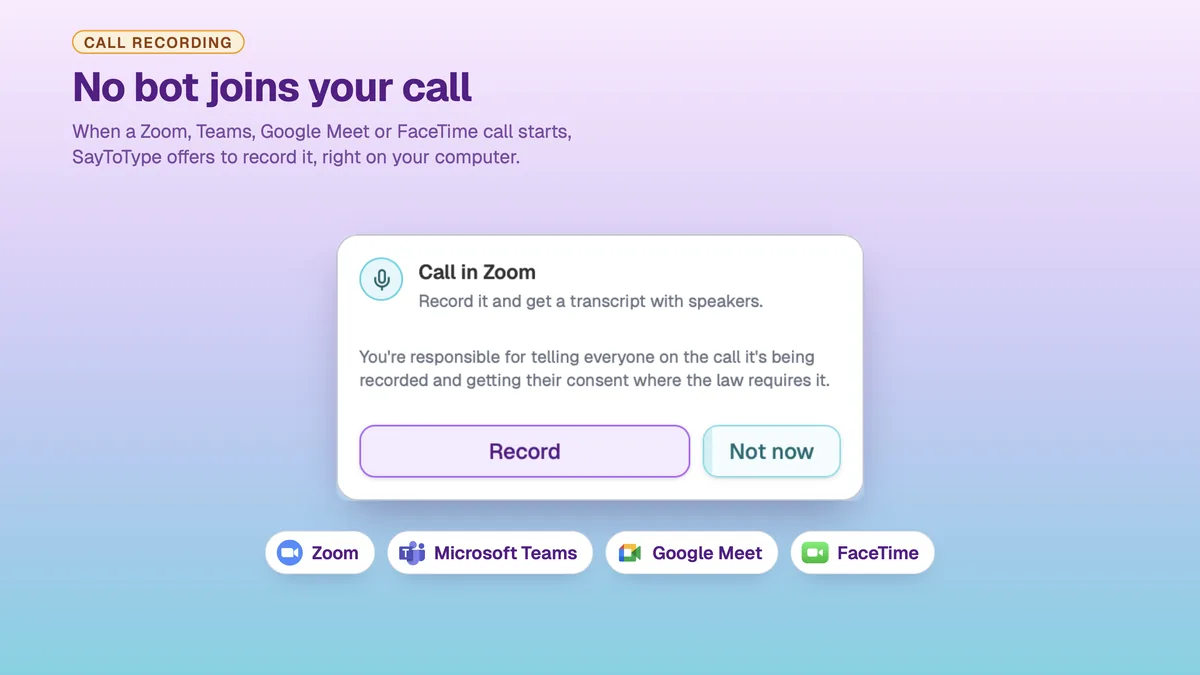
While the recording runs, a small bar shows the time. You can pause it, put it out of sight, or throw the recording away. When the call ends, the recording stops on its own and the transcript is ready a short while later.
Who Said What, in Their Own Names
A transcript that reads Speaker 1, Speaker 2, Speaker 3 is only half useful — you still have to work out who Speaker 2 was. SayToType reads the call's participant list while it records, so the names in the transcript are the real ones.
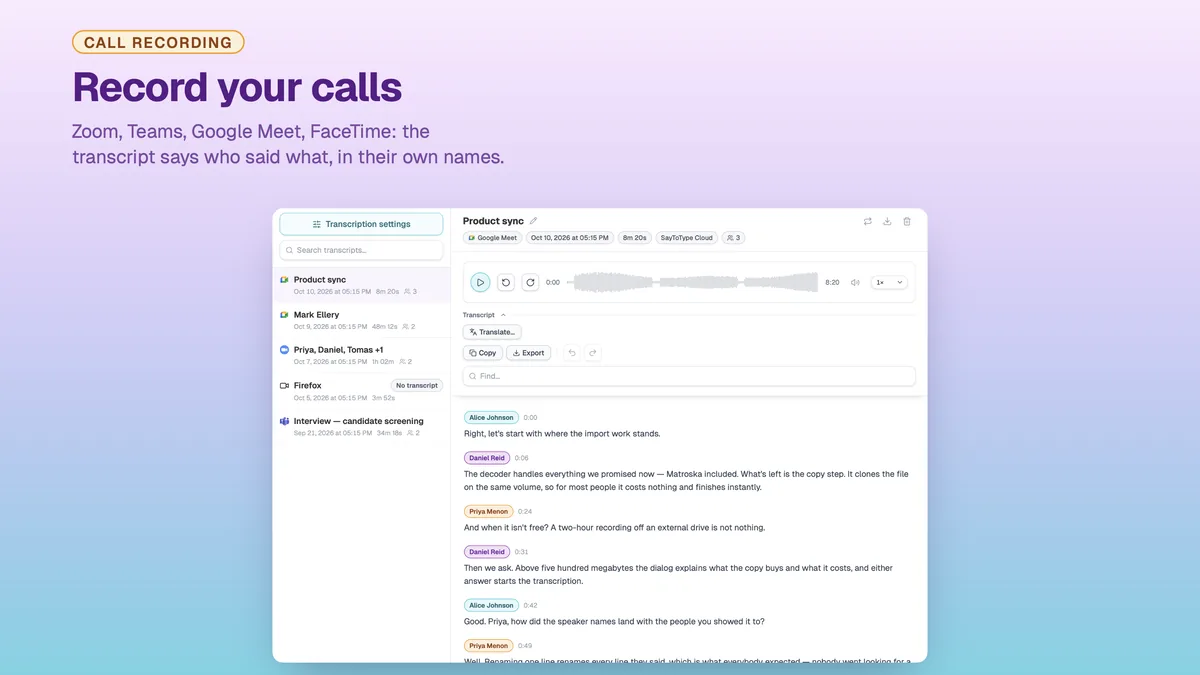
The names are never guessed. A line the app cannot place is left without a name rather than given the wrong one, and any name can be corrected by hand — rename a participant and it changes everywhere in that transcript.
Everything a Transcribed File Can Do
Recorded calls live in a window of their own, and they behave exactly like the files you transcribe in SayToType. Play a call back with the spoken line highlighted, click any line to jump to that moment, and search by participant or by any word in it. Correct any line by hand. Translate the whole transcript into another language on a tab beside the original — timestamps and names carry over. Copy the text out, or export it as plain text, with or without names and timestamps.
Before You Press Record
Recording a call is subject to the law where you and the other participants are, and many jurisdictions require the consent of everyone on the call. SayToType does not announce the recording and does not notify participants — the panel reminds you of this before you press Record, and telling everyone that the call is being recorded is your responsibility. The updated Terms of Service (Section 5) and Privacy Policy, effective October 10, 2026, spell this out, and also cover the files you transcribe: what you upload must be yours to use.
On the data side nothing changes: audio is processed on receipt and never stored on our servers, and the transcript lives only on your device.
Minutes and Plans
Dictation, recorded calls and file transcription draw on the same monthly balance, so a one-hour call costs an hour of it. Every account gets 50 free minutes of cloud transcription a month. A call transcribed through your own API key — OpenAI, Mistral AI, Deepgram or any OpenAI-compatible provider — spends no minutes at all.
How to Get Version 2.3
Call recording is part of the desktop app for Windows and macOS. On Windows the update comes through the Microsoft Store. On a Mac, download SayToType 2.3 and install it over the old version. The iOS and Android apps do dictation only.
Frequently Asked Questions
Which calls can SayToType record?
Calls in Zoom, Microsoft Teams and Google Meet on Windows and macOS, and FaceTime calls on a Mac.
Does a bot join the call?
No. The recording is made on your computer, from your microphone and the call's audio. Nobody in the call sees an extra participant.
Does SayToType tell the other participants that the call is being recorded?
No. Nothing is announced in the call. Telling everyone that it is being recorded, and getting their consent where the law requires it, is your responsibility.
Where do the names in the transcript come from?
From the call's participant list, read while the call is recorded. A line that cannot be placed stays unnamed, and any name can be edited.
Can I turn the recording offer off?
Yes. The offer is a checkbox in the tray menu. Nothing is ever recorded until you press Record.
Does a recorded call cost minutes?
Yes, one for one from the same balance as dictation and file transcription — unless it is transcribed through your own API key, which costs no minutes.
Three Tools, One App
Typing slows you down, a call nobody recorded is forgotten by the evening, and a recording nobody has time to listen to is work already lost. SayToType 2.3 covers all three: your voice becomes your keyboard, a call becomes a transcript with names, and everything you have already recorded becomes text you can search, quote, subtitle and translate.
Download SayToType 2.3 for Windows or macOS, or see the call recording section of the home page for the whole flow in screenshots.